

Overview
Request a 14-day Free Trial Request a Live Demo
Powerful software dedicated to 3D data preparation and simplification for various downstream applications
Optimize CAD models with dozens of algorithms
Optimize CAD models with dozens of algorithms
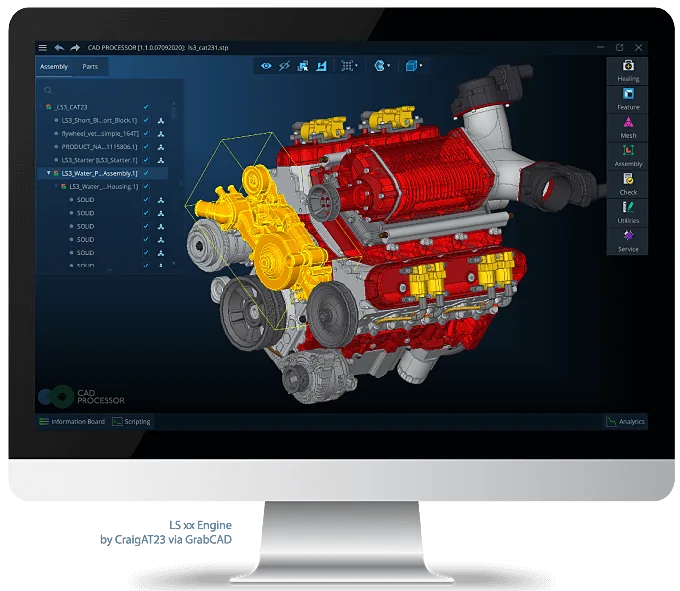
CAD Processor is a software solution allowing preparation and simplification of 3D reference data for dedicated downstream applications. It offers a vast set of accurate, robust and efficient algorithms for effective repair and optimization of CAD parts and assemblies, exporting the data for the downstream use in the most convenient form.
Use CAD Processor at Full Capacity
Use CAD Processor at Full Capacity
- Preparation of scenes for Augmented, Virtual and Mixed Reality
- Geometry simplification for 3D model visualization on low performance devices
- Simplifying 3D data for numerical simulation (FEA mesh generation, CFD)
- Intellectual property protection - hiding parts, deformation of details, preserving outer geometry
- Quality control - comparison of manufactured part to reference CAD model
- Modelling a lightweight digital mock-up of parts or assemblies from heavy CAD files
- Restoration and optimization of 3D data integrity for manufacturing
- Outfitting design - reference geometry simplification for design processes
- Preparation of sheet metal components to fabrication (drawings generating, cost estimation)
Assembly level operations
Assembly level operations
CAD Processor supports native (as-designed) product hierarchy enabling the ability to optimize the original product assembly preserving all metadata (colors, layers, PMI, materials, etc.). On the assembly level users can detect and delete invisible, small, non-solid parts (construction lines, vertices, etc.), hunt down duplicates and break sharing (instancing), bound parts, flatten assembly and traverse assembly hierarchy. Assembly obfuscation feature allows deformation of an assembly for intellectual property protection. A part or sub-assembly can be extracted to a separate document in order to reduce memory usage, and let users focus on a single workpiece (e.g. for mounting).
Additional technical details6 additional sections
Healing operations on part level
Inconsistencies in 3D data resulting from different tolerance values used in different geometric modeling kernels may prevent the use of some transformation operators. Therefore, applying a set of pre-conditioning (repair) algorithms is often necessary to unlock further processing of the imported digital mockup. CAD Processor is reach in both automatic and manual repair operators. The face stitching functionality is used to reconstruct topological sharing between adjacent faces. The face removal utility attempts to delete an interactively selected face from a model and fill its place with extensions of the neighboring faces. Other healing features include gaps detection and filling, canonical geometry recognition, merging small edges and inverting parts.
Defeaturing operations on part level
Defeaturing allows elimination of specific CAD features in order to simplify models without losing the entire design intent. On the part level CAD Processor offers the following simplification operations: detection and suppression of holes and pockets, isolated features (pockets, engravings) removal, repatching and removing faces. Identification of fillet chains with subsequent defeaturing is a highly demanded functionality which is often utilized in mechanical, automotive and aerospace industries. Holes suppression allows to get rid of blind and through cylindrical holes. It works for isolated holes which can be composed of several patches. Defeaturing of holes helps to reduce the number of faces/facets radically.
Inspection operations on part level
CAD Processor includes a wide variety of tools for carrying out inspection of models both visually and numerically for evaluation of their condition, finding issues and tracking simplification results. The solution’s feature set encompasses inspection of contents, geometric tolerances, building bounding box to get a basic idea on the part spatial size. The open edges inspection utility displays the open edges of a selected model, the number of edges shared by one or less face and free boundaries. The mass-inertia checker outputs volume, surface area, center of mass and axes of inertia of the selected objects. These values can be copied to external software for further analysis. CAD Processor also allows checking CAD models for mesh quality, self-intersections or mesh-vs-part deviations.
Mesh processing
CAD Processor allows for interplay between exact B-Rep geometry and polygonal representations. The following key operators are available for mesh models: facets visualization, surface and volumetric mesh generation, mesh decimation and smoothing (Laplacian smoothing). The polyhedrization algorithm allows reducing the number of facets while preserving the fiber-like shape of the input geometry. This operator works best for electrical harnesses simplification. Shrink wrapping is a way to generate computational-quality surface mesh eliminating possible imperfections of the model. Constructing a convex hull on the nodes of the cad-agnostic or visualization mesh can work in either part or assembly mode.
Sheet metal operations
High precision sheet metal working requires CAD simplification and optimization solutions to work with any CAD data to edit geometry, clean up corrupt or complex data, and deliver high quality sheet metal functionality. CAD Processor sheet metal working related feature set allows recognizing flanges, bends, jogs, holes and cutouts in sheet metal parts, unfolding and validating precise flat patterns. Properties extraction (perimeters of holes, cutouts, lengths of cutting lines, etc.), thickness, bending allowances and radius calculation broaden the rich palette of algorithms. The solution enables optimizing product development and production processes, minimizing downtime on the shop floor and calculating fabrication costs automatically.
Product Line
The software’s functionality is offered in two editions
CAD Processor can be delivered in two fully functional forms distinguished by the set of capabilities precisely focusing on customers’ needs.
Desktop
A fully-featured interactive desktop application with a convenient user-friendly graphical user interface (GUI) that is easy to navigate and learn.
Enterprise
CAD Processor Enterprise includes a command-line interface (CLI) with rich scripting capabilities for automated batch processing run on a server. CAD Processor CLI is available for Windows and Linux.
Application views
Product and project views related to this page.